In the world of system and network performance, terms like latency, throughput, and bandwidth are often thrown around as if they were synonymous. They all relate to speed in some sense, but they measure very different aspects of performance. This can lead to confusion and misguided optimizations. A system might boast impressive throughput on a dashboard while users still experience painful delays.
In brief:
- Latency is how long a single request takes (users directly feel this delay).
- Throughput is how many requests or transactions can be handled per second (a measure of capacity).
- Bandwidth is how much data can be transmitted per second (the raw channel capacity).
These are related but not interchangeable concepts.
What is latency?
Latency refers to the time delay for a single operation or request to complete, from start to finish. In networking terms, it’s often the round-trip time for a data packet to go to a destination and back. In a broader system context, latency could mean how long an API call takes to return, or how long a disk I/O operation takes.
Example: If a user clicks a button and it takes 500 ms before they see a response, that 500 ms is the latency of that request.
Latency is felt directly by users as responsiveness. A low-latency system feels snappy, whereas high latency is experienced as lag, loading delays, or jank.
Tip: Track p95/p99 latency, not only averages. Users experience the tail.
What is throughput?
Throughput is the amount of work a system can handle per unit of time.
- APIs: requests/second
- Databases: transactions/second
- Pipelines: records/second
Throughput is primarily a capacity metric. It tells you how much traffic you can handle before saturation.
You can increase throughput by parallelism, batching, or scaling out. But if this introduces queueing, individual requests may become slower — i.e., throughput can rise while latency worsens.
What is bandwidth?
Bandwidth is the maximum data-carrying capacity of a channel (for example, a 100 Mbps link). It is a theoretical ceiling, not the guaranteed real-world transfer rate.
- Bandwidth = potential
- Throughput = actual delivered
A high-bandwidth link can still have high latency (for example, satellite links). Likewise, a low-bandwidth local link can still have low latency.
Highway analogy
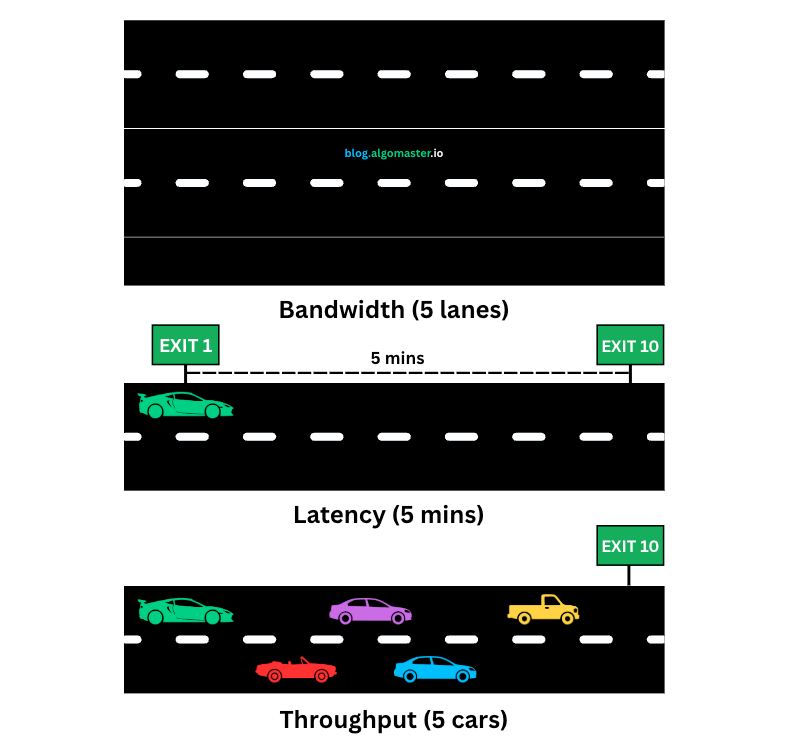
Think of a highway:
- Bandwidth = number of lanes
- Latency = travel time for one car from A to B
- Throughput = number of cars arriving per hour
Even with many lanes, traffic jams can increase travel time and reduce cars/hour. Likewise, systems can have high theoretical capacity but poor real outcomes under congestion.
Throughput vs latency trade-off
High throughput, high latency
A heavily queued or batched system may process many requests per second but make each request wait longer. Dashboards look great; users feel slow.
Low latency, lower throughput
A system optimized for immediate handling can feel very fast per request, but may hit a lower max RPS unless you scale horizontally.
The right architecture depends on product requirements. Real-time experiences prioritize latency; back-office pipelines often prioritize throughput.
Why teams mix these up
Because all three are interpreted as speed, teams may optimize the wrong bottleneck:
- Upgrading bandwidth won’t fix poor p99 latency caused by queueing or inefficient compute.
- Increasing throughput via aggressive batching can hurt interactive UX.
- Reducing average latency while ignoring tail latency can still leave users unhappy.
Key takeaways
- Latency, throughput, and bandwidth are related but distinct.
- Users feel latency; ops dashboards often highlight throughput.
- Bandwidth sets the upper bound for data flow, but doesn’t guarantee responsiveness.
- Measure all three before tuning so you solve the real bottleneck.
If someone says “make it faster,” first clarify whether they mean:
- faster per request (latency),
- more requests processed (throughput), or
- larger data transfer capacity (bandwidth).
The best systems are those that balance all three intentionally.